Movie Maker 3D

Everyone can make realistic animated 3D movies.
  • Home
  • What's New
  • FAQ
  • Blog
  • About
  • Contact
  • Home
  • What's New
  • FAQ
  • Blog
  • About
  • Contact

Movie Maker 3D Blog

Movie Maker 3D app blog.

Screen+Shot+2019-04-04+at+1.12.44+PM.jpg

Timebox Photo Galleries now available on the App Store

Mary Ellen Heinen April 4, 2019

Timebox Photo Galleries, the innovative new 3D/AR version of the Timebox Photo Journal app, is now available on the iOS App Store for iPads and iPhones.

Timebox Photo Galleries is the only app that enables creative photo enthusiasts to design and personalize realistic 3D spaces that their families and groups can use to PRIVATELY combine, organize, explore and enjoy all the photos and stories of the things they do together.

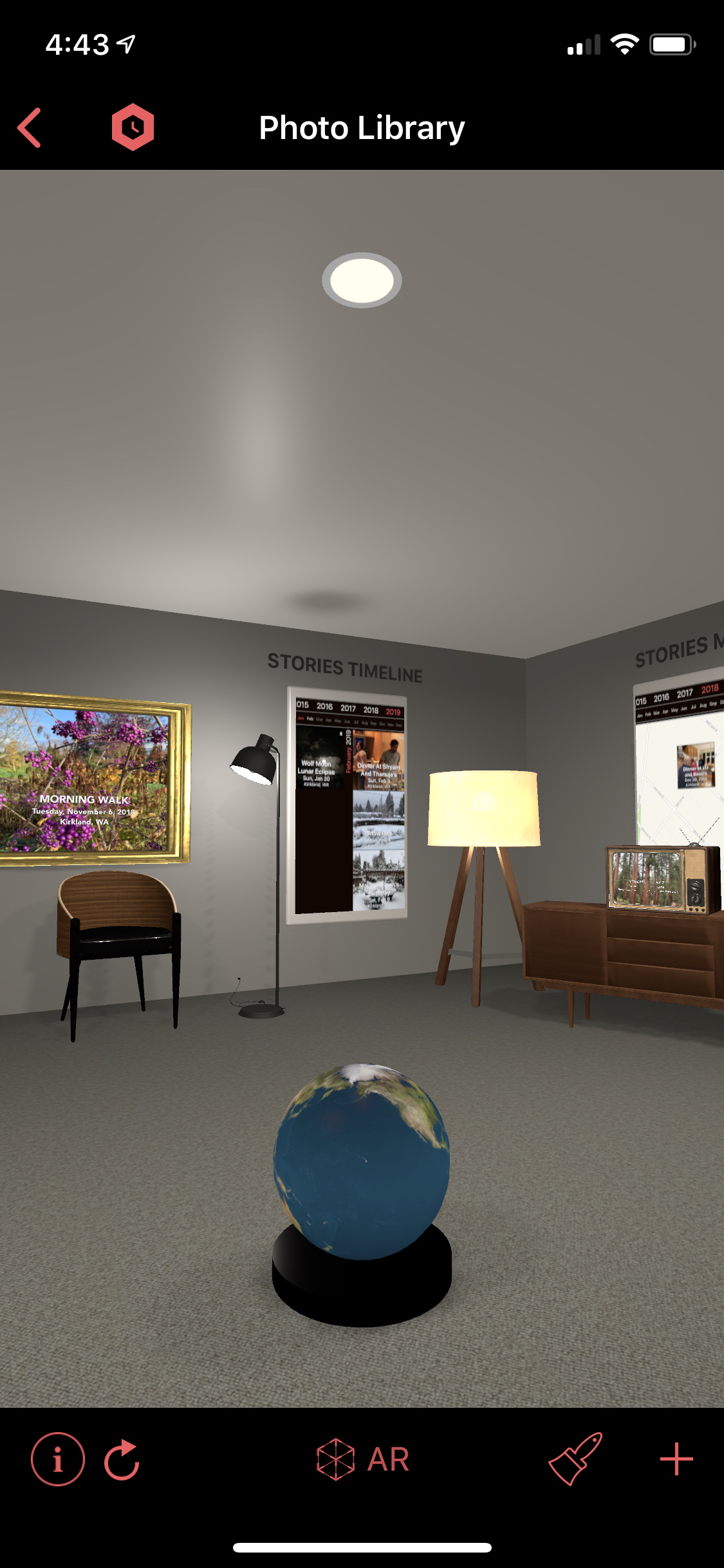
Timebox Photo Galleries is the customizable photorealistic 3D/AR world made up of Galleries, 3D models, Timelines, Maps and Active Photo Frames. Timebox Galleries are displayed as customizable 3D buildings. Two Galleries are included with Timebox and ready for you to design and decorate:

  • One private gallery called Photo Library Gallery.

  • One starter Group Gallery (if you are logged into iCloud).

Screen Shot 2019-04-03 at 10.54.31 AM.png

Express Yourself

Express yourself by designing and decorating your private Photo Library Gallery. Add additional rooms, windows, colors and hundreds of reusable 3D models. With just 2 buttons, Paintbrush and + , you can:

  • Change the exterior building style, roof color and wall color.

    • Add to the exterior:

    • Landscaping

    • Landmarks

    • Vehicles

    • Your own 3D (USDZ) models.

  • Change the interior wall color, floor material and lighting.

  • Add to the interior:

    • Furnishings

    • Decor

    • Active Photo Frames

    • Landscaping

    • Landmarks

    • Sports equipment

    • Musical instruments

    • Vehicles

    • Your own 3D (USDZ) models!

 
Screen Shot 2019-04-03 at 10.54.11 AM.png

Explore

Explore your Galleries by "walking around" the 3D scenes in Timebox using the normal iOS gestures to pan and pinch zoom.

Once you’ve given Timebox permission to access your Photos, the powerful TIMEBOX ENGINE automatically creates long-lasting daily Photo Stories from your 1000s of full-fidelity photos, videos and Live Photos in your iOS Photo Library.

It presents them on addicting TIMELINES, MAPS and ACTIVE PHOTO FRAMES in your Photo Library Gallery.

As long as you have Location Services turned on pins will also appear on the GLOBE. Add your stories, captions and tags. Make stitched together movies from a selections of Photo Stories and more.

Timebox Grid and Map Timelines are searchable, scrollable presentations of your Photo Stories organized by day.

They can be customized to show only a particular date, range of dates, trip or person for example and added to any room or Gallery.

 
Screen Shot 2019-04-03 at 10.55.33 AM.png

Timebox Group Galleries

Timebox Group Galleries are designed specifically for groups of people who want to PRIVATELY combine their photos, videos, Live Photos and stories.

PERSONALIZE the interior and exterior of your Group Gallery. Easily add the Photo Stories that everyone keeps asking you to share. Invite the people you want to visit your Gallery so they “walk around" and add their own Photo Stories to yours creating a long-lasting shared memory. Perfect for:

  • Family Stories

  • Group Travelogues

  • Birthdays

  • Team Galleries

  • Events

  • Memorials

  • Group Projects

People you invite can make changes but you can change their permissions to view only on a person-by-person basis.

The Timebox Photo Galleries app is iOS only but people without iOS devices can view your Galleries but not collaborate using the timebox.co web app.

Screen Shot 2019-04-03 at 10.54.49 AM.png

Active Photo Frames

Active Photo Frames are fun new way to play your Photo Stories as slideshows anywhere in your Galleries.

Choose from multiple frame shapes, finishes and colors including televisions and easels.

Select individual or multiple Photo Stories to add to the frame along with a number of options including Repeat (slideshow mode).


Augmented Reality

AR is another fun way to further explore your Timebox 3D Galleries. it’s easy, just tap the AR button, hold up your device and look around.

 
Screen Shot 2019-04-03 at 10.56.56 AM.png

TIMEBOX PHOTO GALLERIES 2D

If your iOS device does not meet the minimum requirements for the Timebox Photo Galleries app you will see the 2D version and not the 3D/AR version.

The 2D version of Timebox provides the same privacy and collaboration features that the 3D/AR version provides so that you and your family and groups can PRIVATELY combine, organize, explore and enjoy all the photos and stories of the things you do together.

The 2D version will look very familiar to our Timebox 5.x customers with one huge addition of the Map Timeline. Now you can see all your stories on a scrollable, searchable Map. We hope you like it.


Privacy

Please note: None of the data in the Timebox app is ever retained by or visible to our company, Pepper Networks, LLC. All of the data that's in the Timebox app is either on your own device (iPhone or iPad) or in your own personal iCloud account. In other words, it’s only ever visible to you or people that you invite to share your data (i.e., to a group gallery). As always, no extra sign ups, accounts, passwords or subscriptions. No uploading (except when adding to a Group Gallery). No ads.

Thank you

Thank you to the Timebox community and all the people who helped us make Timebox Photos Galleries a better app. We couldn’t have done it without you. Please let us know if you have any suggestions, questions or comments about the new version.

We’re already working on 6.1 and more 3D models.

Enjoy!

Mary Ellen and Len

Comment
TimeboxOutdoorScreenshot.jpeg

Announcing the Timebox 6.0 Photo Galleries Beta Test

Mary Ellen Heinen March 13, 2019

Introducing Timebox Photo Galleries, the innovative new version 6.0 of the Timebox Photo Journal!

Timebox Photo Galleries is the only app that enables creative photo enthusiasts to design and personalize realistic 3D/AR spaces that their families and groups can use to PRIVATELY combine, organize, explore and enjoy all the photos and stories of the things they do together.

We listened to your comments and feedback, added our own ideas, design goals and vision to create a ground-breaking new version of Timebox.  The team worked hard, completed the design requirements, performed thousands of tests, fixed bugs, conducted mini Beta tests and have finally decided it's ready for you to try. 

Get the Timebox Photo Galleries Beta Test

About Timebox Photo Galleries

If you’re a current Timebox customer you’ll still see your photos, videos and Live Photos organized into daily Photo Stories but now you’ll see them through a new customizable, collaborative, photorealistic 3D/AR world of:

  • Gallery buildings and rooms

  • Grid and Map Timelines

  • 3D models

  • Active Photo Frames 

Two Galleries are included with Timebox and ready for you to design and decorate:

  • One private gallery called Photo Library Gallery.

  • One starter Group Gallery (if you are logged into iCloud).

Express yourself by designing and decorating your Galleries. Add additional rooms, windows, colors and hundreds of reusable 3D models. With just 2 buttons, Paintbrush and +, you can:

  • Change the exterior building style, roof color and wall color.

  • Add to the exterior:

    • Landscaping

    • Landmarks

    • Vehicles

    • Your own 3D (USDZ) models.

  • Change the interior wall color, floor material and lighting.

  • Add to the interior:

    • Furnishings

    • Decor

    • Active Photo Frames 

    • Landscaping

    • Landmarks

    • Sports equipment

    • Musical instruments

    • Vehicles

    • Grid and Map Timelines 

    • Your own 3D (USDZ) models

All 3D models will be free during the Beta test. When Timebox ships the 3D models will be available for free or as In-App Purchase. 

Explore your Galleries by "walking around" the 3D scenes using the normal iOS gestures to pan and pinch zoom.

Privately share your own 3D Group Galleries as a unique new way to present your visual stories and collaborate with your family, friends, colleagues and clients. Create and personalize your Gallery. With the + add the Photo Stories from your Photo Library Gallery that everyone wants to see. Invite your friends to visit and see what happens next as everyone adds their Photo Stories to yours creating a long-lasting shared memory.

Group galleries are great for anything shared: trips, events, memorials, celebrations, sports, projects and more.

Further explore your Galleries in the interactive AR (Augmented Reality) mode by tapping the AR button, holding up your iPad or iPhone and walking around.

Be sure to try the fun new Active Photo Frames and play your favorite Photo Stories as slideshows anywhere in your Galleries. Choose from multiple frame shapes, finishes, colors and options.

Even though this version of our app is new, many things remain the same including:

  • The fact that your privacy is very important to us. None of the data in the Timebox app is ever retained by or visible to our company. 

  • There are no extra signups, accounts, passwords, uploading or ads.

Get the Timebox Photo Galleries Beta Test

How to Participate

To participate in the Timebox Beta Test, on your iOS device tap https://testflight.apple.com/join/ZptvvEDk (or one of the red buttons in this post) which will take you through downloading Timebox Photo Galleries via Apple's TestFlight app. 

If you already have Timebox installed on your device, the Beta Test version will update your current version.

If you’re new to Timebox (Welcome!), please give Timebox permission to access your Photos so they can be displayed in your grid and map Timelines.

To enjoy the new Timebox Photo Galleries and Augmented Reality (AR) experience, you’ll need one of these iPhones or iPads running iOS 12.1 or later:

   •  iPhone 6S, 7, 7S, 7+, 8, 8+, X, XS, XS Max, XR 
   • iPad Pro or iPad since March 2017

If your iOS device does not meet these requirements you’ll experience the updated 2D user interface.

If you know someone who would also like to try the Timebox Beta Test, please send them the TestFlight link. Once they follow the same steps, you'll both be ready to collaborate in Timebox Group Galleries.

As a Beta tester, feedback the only thing we ask of you. Please let us know what you think of our Timebox Photos Galleries app. You can send feedback directly from Timebox by tapping the Timebox icon or send us email to one of the addresses below:

Mary Ellen Heinen, CEO - me.heinen@timeboxapp.com
Len Kawell, CTO - len.kawell@timeboxapp.com
Timebox Support - support@timeboxapp.com

Thank you for helping us make a better app!

Mary Ellen and Len

Comment
IMG_186A5FA9C036-1.jpeg

Timebox 6.0 Sneak Peek

Mary Ellen Heinen February 15, 2019

Over the last year, we've been working hard on the next version of Timebox - Timebox Photo Galleries 3D. We’ll be ready to show you more soon but in the meantime here are a few screenshots. Stayed tuned!

IMG_393D99AD7A01-1.jpeg
IMG_07095267D3F7-1.jpeg
Comment
  • Movie Maker 3D Blog
  • Older
  • Newer

MOvie Maker 3D Blog

Mary Ellen and Len, the founders of Pepper Networks and the creators of Movie Maker 3D, periodically write about the Movie Maker 3D app and related topics.

Movie Maker 3D Blog RSS
  • February 2026 (1)
  • January 2026 (1)
  • December 2025 (2)
  • July 2025 (1)
  • June 2025 (1)
  • February 2025 (1)
  • January 2025 (1)
  • November 2024 (1)
  • October 2024 (1)
  • September 2024 (1)
  • June 2024 (1)
  • May 2024 (1)
  • April 2024 (1)
  • January 2024 (1)
  • December 2023 (1)
  • November 2023 (1)
  • September 2023 (1)
  • June 2023 (1)
  • April 2023 (1)
  • March 2023 (1)
  • February 2023 (1)
  • January 2023 (1)
  • December 2022 (2)
  • November 2022 (1)
  • October 2022 (1)
  • September 2022 (1)
  • August 2022 (1)
  • June 2022 (1)
  • April 2022 (1)
  • March 2022 (1)
  • January 2022 (1)
  • December 2021 (1)
  • November 2021 (1)
  • October 2021 (1)
  • September 2021 (3)
  • June 2021 (1)
  • May 2021 (2)
  • April 2021 (2)
  • March 2021 (1)
  • February 2021 (1)
  • January 2021 (1)
  • December 2020 (1)
  • November 2020 (1)
  • October 2020 (3)
  • August 2020 (1)
  • July 2020 (1)
  • June 2020 (1)
  • May 2020 (1)
  • April 2020 (2)
  • March 2020 (1)
  • February 2020 (1)
  • December 2019 (2)
  • November 2019 (2)
  • October 2019 (2)
  • September 2019 (1)
  • August 2019 (1)
  • July 2019 (1)
  • June 2019 (1)
  • May 2019 (5)
  • April 2019 (1)
  • March 2019 (1)
  • February 2019 (1)
  • January 2019 (1)
  • December 2018 (2)
  • November 2018 (1)
  • October 2018 (2)
  • August 2018 (2)
  • July 2018 (1)
  • June 2018 (1)
  • May 2018 (1)
  • April 2018 (1)
  • March 2018 (1)
  • February 2018 (1)
  • January 2018 (1)
  • December 2017 (3)
  • November 2017 (2)
  • September 2017 (1)
  • June 2017 (1)
  • May 2017 (1)
  • April 2017 (1)
  • March 2017 (2)
  • February 2017 (1)
  • January 2017 (1)
  • November 2016 (1)
  • October 2016 (1)
  • September 2016 (1)
  • July 2016 (2)
  • June 2016 (2)
  • May 2016 (1)
  • April 2016 (1)
  • January 2016 (2)
  • December 2015 (2)
  • November 2015 (1)
  • August 2015 (1)
  • July 2015 (1)
  • June 2015 (1)
  • May 2015 (2)
  • April 2015 (3)
  • March 2015 (1)
  • February 2015 (2)
  • January 2015 (3)
  • December 2014 (2)
  • November 2014 (2)
  • October 2014 (3)
  • September 2014 (1)
  • August 2014 (1)
  • July 2014 (2)
  • June 2014 (3)
  • May 2014 (2)
  • April 2014 (2)
  • March 2014 (2)
  • February 2014 (1)
  • December 2013 (2)
  • November 2013 (3)
  • October 2013 (2)
  • September 2013 (2)
  • June 2013 (1)
  • April 2013 (1)
  • March 2013 (1)
  • February 2013 (2)
  • January 2013 (2)
  • December 2012 (1)
  • November 2012 (3)
  • October 2012 (2)
  • August 2012 (1)
facebook youtube instagram-unauth url vimeo-unauth
  • Terms of Use
  • Privacy Policy

© 2026 Pepper Networks, LLC. All rights reserved.

Movie Maker 3D

Everyone can make realistic animated 3D movies.

Movie Maker 3D is an app for iPhones, iPads and Macs that makes it simple for everyone to create realistic, animated movies and videos with multiple scenes, hundreds of programmable 3D models, custom avatars and more.

Pepper Networks, LLC | 710 14th Ave W, Kirkland, WA, US

facebook youtube instagram-unauth url vimeo-unauth