Timebox Feedback

image

We appreciate all the thoughtful reviews that people have posted in the App Store and the comments that have been sent to us directly. We are interested in building an app that people think is truly useful and we are very focused on that goal.

However it takes time to find out what people want and then to build it (building always seems to take a bit longer than we think). So we are constantly collecting a list of requested features and will add them to future updates as soon as we can.

We love hearing from you and would like to address a couple of recent questions:
  1. Timebox does not require your name or birthday. However, Timebox works better if it has a starting date on which to base the Timeline, Yearbook, etc. But as we say in the Welcome page help text, both of these are “optional” in the sense that you can enter anything you like but you must enter something.
    Your name and birthdate are completely private and only stored in your Timebox. We NEVER use them for anything external to your Timebox.
  2. When your device is normally backed up, your Timebox will be included in that backup. We offer the Timebox Cloud Service in case you would like to purchase extra “archival” storage and multi-device sync.
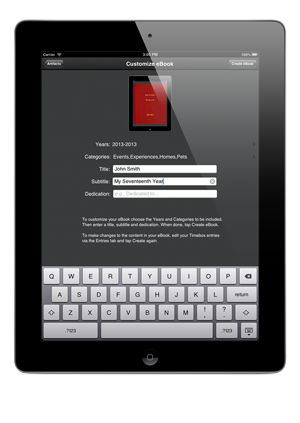
  3. image You can easily create a free PDF of any entry in your Timebox by taping on the share button imagewhile viewing an entry. The basic ebook artifact, available on the Artifacts page, is also now free (as of version 1.3) and we will soon offer different ebook designs for $0.99.
  4. Dropbox will soon be added to Timebox as a source of photos.
Please tell us how you think Timebox can be a better app - we’re listening. Send us email (support@timeboxapp.com or me.heinen@pepper.com).

Thanks! 

Ebooks are now free in Timebox 1.3!

image From a teacher “I LOVE Timebox! It is clear, beautiful, and easy for my [students] to use almost daily as an archive of their ah-ha moments and life events…I cannot afford to pay the $.99 for each [student’s] ebook creation. My school does not have enough funding to pay for it either. I need a free way of having access to their entire creations. Otherwise, it’s on an iPad unable to be shared and therefore useless to me as a teacher.”
 
We wanted to help so we decided to offer our basic ebook to everyone for free. In the future, we will offer a selection of additional ebook designs for $0.99, but the basic ebook design will always be free.
 
Two additional features in Timebox version 1.3:
  • Improved Timeline view scrolling performance;
  • Tap on a photo in the Yearbook view to zoom to full screen.
We appreciate all your comments and feedback. Please keep them coming.
 
Thanks!

What's new in Timebox 1.2

Photo Date Editing

Version 1.2 of Timebox is now available with the following new features:

  • Edit the dates on photos. This is especially useful when you add older photos to your Timebox.
  • Add and view unlimited text in detail fields.
  • Timeline and Yearbook improvements.
  • Additional bug fixes and performance improvements.

We thought you might be interested in some of the ways that people are using Timebox. We’ve heard from people who are using it for:

  • A photo journal for trips and parties
  • Collecting personal medical information
  • Tracking employment history
  • A portfolio for paintings and quilts
  • Special family recipes
  • Keeping pictures of belongings for insurance purposes
  • Recording fishing and gardening data
  • Remembering memorable wines and dinners
  • Collecting cherished family photos and physical objects by scanning them or taking pictures of them with their iPad or iPhone and adding them to Timebox

We hope you like the new features. Please let us know what you think and if you have any problems or suggestions for the app.

Thanks!