Version 2.0 Sneak Peak

image

Timebox version 2.0 will be available soon and we wanted to give you a sneak peak of the patent-pending features we have been working on for the past few months. 

  • It’s still about your stories.
  • Add photos to new stories and existing stories from many sources at once including Dropbox!
  • New 3D photo browser by date with geographic location information for photos taken with your iOS devices.
  • Create long lasting artifacts:
  •      Hardcover books
  •      Softcover magazines
  •      Laser engraved aluminum cubes - preview your cube in 3D
  • Timeline customization features.
image

If you already have Timebox you will see the update as soon as it is available from the App Store. If you do not have Timebox download it today. 

We appreciate all the feedback we have received and would love to hear more from you. All comments welcome!

Thank you for helping us make Timebox a better app.

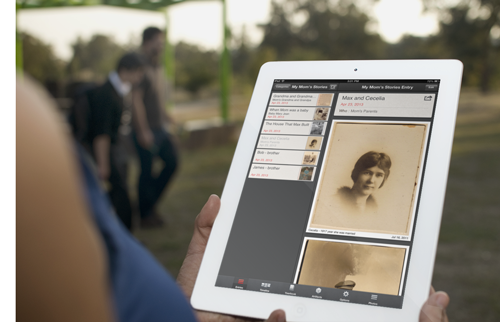
My Mom's Stories

Admittedly we have been having trouble getting a blog post out. We are working hard on the next version of Timebox that will be out early this Summer.

On a recent visit to my hometown, Milwaukee, WI, my Mom loaded me up with her family photos and the stories to go with them. I was so involved in our conversation that I almost missed my flight home. Later when I confronted my notes and the manilla envelope of photos I was lost. I figured out my list of descriptions numbered 1-48 referred to the scanned photos in the corresponding order. But what about the picture with the written note “engagement picture” but not sure which one or the story about the fire and being carried down the ladder?

I will see my Mom this weekend and will fill in the blanks. I will create a new category in Timebox called My Mom’s Stories and every story will be an entry.

There is also an envelope of photos with pictures of me and my 6 siblings when we were little. I will create another new category called When We Were Small and every story will be an entry.

The upcoming version of Timebox will include the ability to create custom paper books so I will be able to easily share my Mom’s memories with her and my Dad, my siblings and my 15 nieces and nephews. Since ebooks are available today, there may be no reason to wait.

I can’t wait to be further along in this project and talking (arguing?) to my family about our past — so fun!

We have been getting great feedback and appreciate every single comment! Please keep the suggestions coming and if you could rate us in the App Store or add a brief comment - we would appreciate it.

Thanks so much.

Mary Ellen

[And thanks to PlaceIt by Breezi]

Tips for using Timebox

image

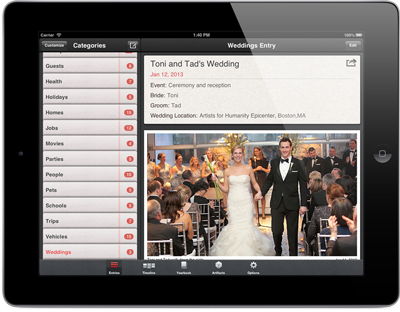
Good friends of ours were recently married and they shared their stories and a few of their favorite photos* via Timebox.

From their experience we realized that a few features of Timebox may be a bit hard to discover or unintentionally difficult to use. We hope the tips below help make Timebox easier and more fun to use.


image

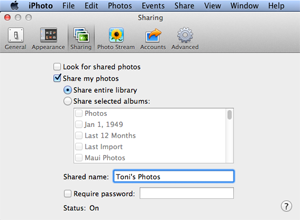
Adding photos directly from iPhoto on your Mac
If you have a lot of photos (for example, a zip file of all the photos from your wedding photographer), first add them to a folder on your Mac and then import them into iPhoto (File > Import Into Library). Then open the iPhoto Preferences dialog box (iPhoto > Preferences…), tap on Sharing and then enable “Share my photos.” You can then directly access all your photos (by iPhoto album if you like) wirelessly from your iPhone/iPad. In other words, you don’t have to sync all of them with your iOS device. Instead Timebox allows you to directly grab only the photos from iPhoto that you want when you tap Add Photos.
image

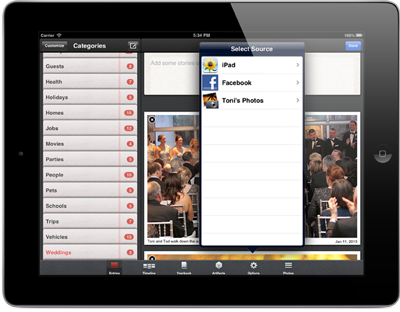
Adding photos directly from Facebook
Timebox also has direct photo add from Facebook. So if you have some photos on Facebook, you can open a new Entry or edit an existing one, tap Add Photos, then tap Facebook. Once you go through the usual iOS and Facebook app approval steps, you can wirelessly pull any photos you like from one of your Facebook albums directly into your Timebox. You can also add photos you were tagged in.

Viewing and zooming your photos
When you share a Timebox page or make an ebook, Timebox creates a PDF for you. Timebox “down samples” the photos to 300 DPI (dots-per-inch) in the PDF so the PDF doesn’t get too big. When you view the PDF on your Mac, PC, tablet or phone you can zoom in to the photos and see a lot of detail. If you’re viewing your photos in Timebox itself, you can zoom in and see the full resolution of the photos since we always retain the photos at full resolution (unlike Facebook, which downsamples them). To zoom in and pan around on any photo in Timebox, just tap the photo (except while in Edit mode).
image

Sharing your stories via email, posting on Facebook or Tweet
Just tap the share button and choose your method of sharing.

Timebox on all your devices
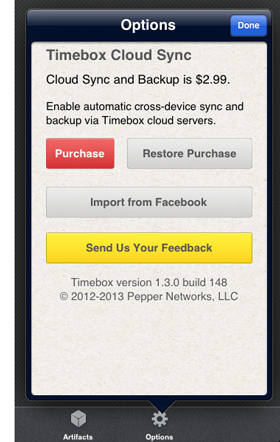
If you have some photos on your iPhone and some on your iPad, with the  Timebox Cloud Sync and Backup upgrade, you can edit your Timebox entries or add photos on any device and you’ll always have a synchronized copy on your iPhone, iPad and iPod Touch. Simply tap the Options tab in Timebox and purchase the Cloud Sync and Backup upgrade for $2.99. The upgrade also comes with an additional 8GB backed up cloud storage.

Congratulations Toni and Tad!!!

* Toni and Tad’s wedding photo by Dennis Kwan Weddings.